
I have a complicated relationship with the Freewrite.
On paper, it is the perfect device: a dedicated typewriter with an e-ink screen that syncs to the cloud. In reality, it is a $600 luxury item with a proprietary cloud service (“Postbox”). I love the idea of it, but I can never justify the price tag for what is essentially a glorified calculator that runs Microsoft Word 1.0.
I am a proponent of the used Alphasmart Neo 2, which is my distraction-free writing tool of choice to work on my novel.
But now, there is a new challenger. It’s called the Zerowriter Ink, and it is the first device that actually threatens the Freewrite’s monopoly on hipster minimalism.
I have not touched this device yet—it is currently shipping from its Crowd Supply campaign—but on paper, it fixes almost every gripe I have with modern writing decks.
The Specs
- Product Name: Zerowriter Ink
- Type: Open Source E-Paper Typewriter
- Price: ~$229 – $269 (depending on batch)
- Display: 5.2″ E-Paper (1280 x 720)
- Keyboard: 60% Mechanical (Low-Profile Kailh Choc Switches)
- Battery: 5,000 mAh (Weeks of writing)
- Connectivity: USB-C & SD Card (No native Cloud Sync)
- Distraction Level: 0% (It literally cannot browse the web)
The “Open Source” Promise
The biggest selling point of the Zerowriter Ink isn’t the screen; it’s the philosophy.
Most modern tech is a “black box.” You buy it, you use it until the battery dies, and then you throw it away. The Freewrite is similar—if Astrohaus ever shuts down their cloud servers, you lose a massive chunk of the device’s functionality.
The Zerowriter is Open Source Hardware. The schematics are public. The software is Arduino-based. The switches are hot-swappable (meaning you can pull them out and replace them if they break or if you want a different “click” feel).
It is built to be repaired, not replaced.
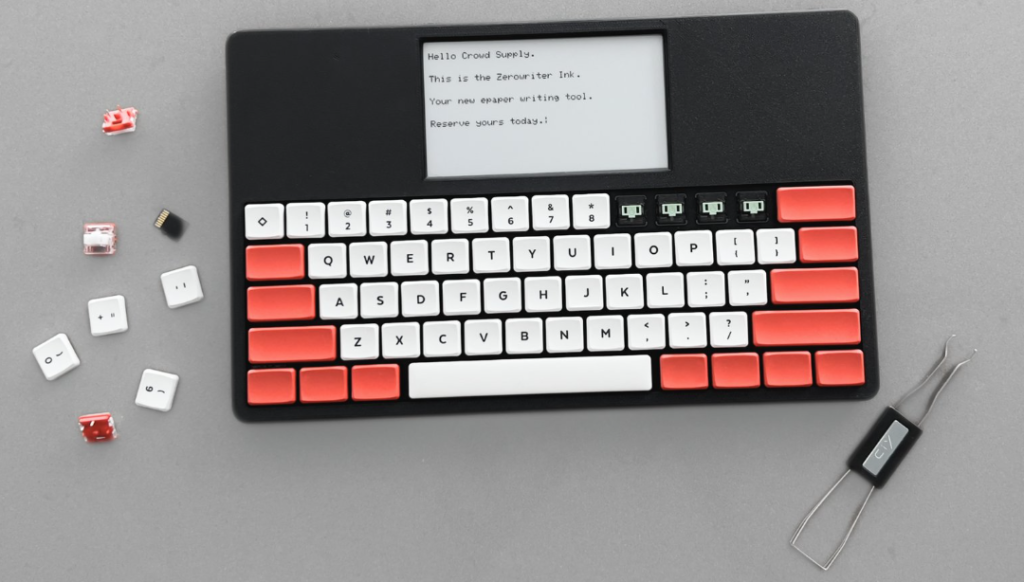
The “Cyberdeck” Aesthetic
It doesn’t look like a polished Apple product. It looks like a “Cyberdeck”—a piece of hacking gear from a William Gibson novel. It has exposed screws, a raw industrial look, and a screen that sits flat rather than on a hinge.
For a certain type of writer (me), this is incredibly appealing. It feels like a tool, not a toy.
How It Compares
The market for “distraction-free writing” is small, but fierce. Here is how the Zerowriter stacks up against the heavy hitters:
1. Zerowriter Ink vs. Freewrite Traveler
- Price: Zerowriter is ~$250. Freewrite Traveler is ~$500+.
- Keyboard: Zerowriter has mechanical keys (clicky, tactile). Traveler has scissor switches (laptop style).
- Syncing: Freewrite auto-syncs to Google Drive (convenient). Zerowriter saves to an SD card (manual, but private).
- Verdict: If you need the cloud, Freewrite wins. If you want a better typing feel and repairability, Zerowriter wins.
2. Zerowriter Ink vs. Alphasmart Neo
- Screen: Zerowriter has a sharp, high-res E-Ink display. The Neo has a low-res, grey LCD calculator screen from 2004.
- Backlight: Neither has a backlight (you need a lamp).
- Transfer: Zerowriter uses an SD card. The Neo requires a USB cable to “paste” text into your computer.
- Verdict: The Neo is still the king of value ($40 vs $250), but the Zerowriter is the modern successor we’ve been waiting for.
| Feature | Zerowriter Ink | Freewrite Traveler | Alphasmart Neo |
|---|---|---|---|
| Price | ~$250 | ~$500+ | ~$40 |
| Keyboard | Mechanical (Clicky, tactile switches) |
Scissor Switch (Flat, laptop-style) |
Membrane |
| Screen | High-Res E-Ink (Sharp, modern) |
E-Ink | Low-Res LCD (Grey, calculator-style) |
| Backlight | No | No | No |
| Syncing | SD Card (Manual & Private) |
Cloud / Wi-Fi (Auto-syncs to Drive) |
USB Cable (Manual “Paste”) |
| The Verdict | The Modern Successor Best for typing feel & repairability. |
The Convenience Choice Best if you need Cloud sync. |
The Value King Best if you are on a budget. |
Pros & Cons
Pros:
- The Price: At roughly half the cost of a Freewrite, it makes e-ink typing accessible.
- The Keyboard: Hot-swappable mechanical switches on a portable device is a dream for touch typists.
- No “Subscription” Risk: Because it doesn’t rely on a company’s server to sync notes, it will work forever.
Cons:
- Small Screen: At 5.2 inches, it is wider than a phone but shorter. You only see a few paragraphs at a time.
- Crowdfunding Risk: This is a small team, not a massive corporation. Support might be slower or less available.
- No Cloud: For some, pulling an SD card out feels archaic. (Personally, I like the friction).
The Verdict
I am incredibly intrigued.
The Zerowriter Ink feels like the device the community wanted all along: a simple, rugged, mechanical typewriter that doesn’t try to be “smart.” It just wants to write.
I haven’t ordered one yet because I am currently happy with my Alphasmart setup, but if you are looking for that e-ink magic without the $600 price tag, this is the one to watch. I’d just wait a bit to make sure they ship and get a proper hands-on review.
Frequently Asked Questions
Does the Zerowriter Ink have a backlight? No. Like most pure e-ink devices (and the original Kindle), it relies on ambient light. You cannot write in the dark without a lamp.
Does it sync to Google Docs or Dropbox? Not out of the box. It saves .txt files to a microSD card. However, because the software is open source, the community is already working on plugins to add Wi-Fi syncing capabilities.
Can I change the font size? Yes. The interface is minimal, but it allows you to adjust font size and refresh rates to suit your eyes.
Is it better than an Alphasmart? Technically, yes. The mechanical keyboard and e-ink screen are major upgrades. But the Alphasmart can be found for $60 and is kinda indestructible. The Zerowriter is a luxury upgrade for people who care about “switch feel.”