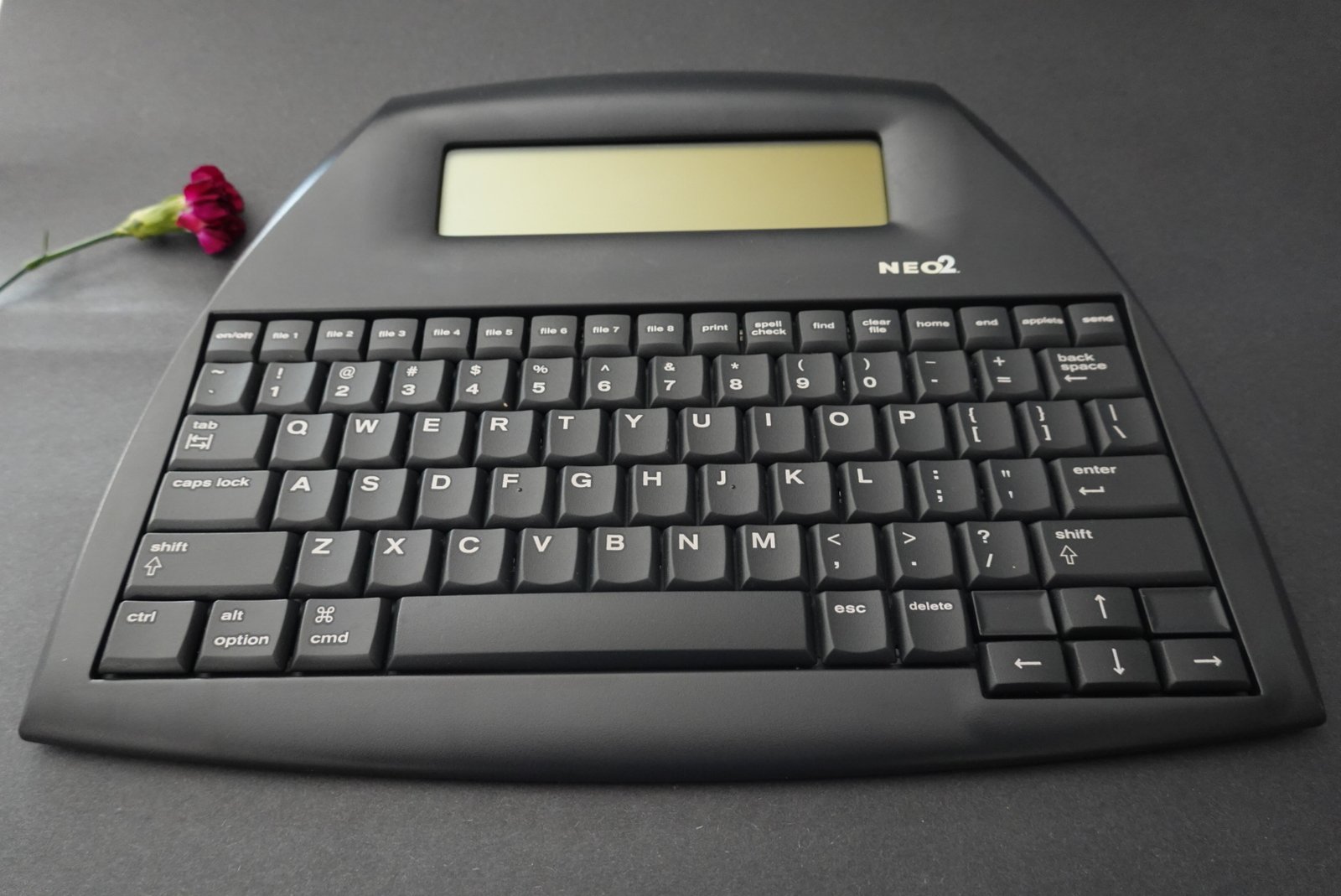
I didn’t buy the AlphaSmart because I needed another keyboard. I bought it because I needed to stop editing sentences before I finished writing them.
Writing on a modern laptop is an exercise in self-defense. You are constantly fighting off notifications, email pings, and the urge to “just quickly check” a fact, which inevitably leads to a 20-minute deep plunge into the history of the spork.
I wanted a “Writer’s Deck”—a dedicated machine that does exactly one thing: captures words. Now that my short-story collection is out, I need all the focus I can get to complete my novel.
I stalked eBay for weeks, ignoring the beat-up units formerly used by school districts. I waited for an immaculate AlphaSmart NEO2 that looked untouched, complete with a fresh internal backup battery (important for memory storage) and a working USB cable. When one popped up for $95, I didn’t hesitate.
The Specs
- Release Year: 2007
- Original Retail Price: $219
- Battery Life: ~700 Hours (3x AA batteries); CR2032 for data backup
- Distraction Level: 0% (No Wi-Fi, No Apps, No Hope of Procrastination)
- Acquisition Cost: $95.00 (eBay, immaculate condition w/ new backup coin battery)
The Device: Built Like a Tank
The NEO2 looks like something issued to a stormtrooper. It is a wedge of dark grey plastic that feels virtually indestructible.
- The Screen: It’s a monochrome LCD that shows about 4-6 lines of text. That’s it. No backlight. No blue light to fry your retinas at 11 PM.
- The Keyboard: This is the secret sauce. The NEO2 uses full-travel scissor switches that feel shockingly good, some say better than the butterfly keyboard on a $2k MacBook. It has a “thocky” sound that makes you feel like you are doing work.
The Workflow: The “Ghost Type” Ritual
The beauty of the NEO2 isn’t just typing on it; it’s the transfer process. Since it has no cloud sync, you can’t “share” the file. You have to physically tether it.
My protocol is simple:
- Draft Mode: I take the NEO2 to a coffee shop (ok, usually just the couch). I pop on an Explosions in the Sky album, and I write. I cannot open new tabs. I cannot bold or format. I just type. And think. And type.
- The Transfer: When I’m done, I plug the NEO2 into my computer via USB. I open a blank Google Doc. I hit the “Send” button on the NEO2. The device then acts as a keyboard emulator. It “ghost types” my entire draft into the Google Doc, character by character, as I sit back and criticize my words as they pour onto the screen.
It is a slice of pure analog-to-digital satisfaction. Then, and only then, do I allow myself to edit.
AlphaSmart NEO2 vs. Freewrite
If you are looking for a distraction-free writing tool in 2026, the algorithm will inevitably serve you ads for the Freewrite (Smart Typewriter or Traveler). It is beautiful. It has an E-ink screen. It syncs to the cloud. It also costs over $500…if you can find one.
So, how does the $95 AlphaSmart stack up against the luxury option?
- The Screen: The Freewrite uses E-ink, which is gorgeous but can have a slow refresh rate (lag). The NEO2 uses a reflective LCD. It’s lower tech, but the text appears instantly. No lag.
- The Sync: Freewrite syncs effortlessly to the cloud via Wi-Fi. As discussed, the NEO2 requires a physical USB cable and “ghost typing.” The Freewrite wins on convenience; the NEO2 wins on “air-gapped” security.
- The Battery: The Freewrite lasts weeks. The NEO2 lasts for years (700+ hours).
- The Vibe: The Freewrite feels like a boutique instrument you handle with care. The NEO2 feels like a tank you can toss into a backpack without a case.
The Reality Check: The Freewrite is a lifestyle product for “being a writer.” The AlphaSmart is a utility tool for writing. If you have the budget and love E-ink, the Freewrite is a lovely luxury. But if you just want to get words down without fear of breaking a $600 device, the NEO2 is the pound-for-pound champion.


The Verdict
Pros: Incredible 700+ hour battery life, excellent keyboard feel, instant-on (boot time is 0.1 seconds), virtually indestructible.
Cons: No backlight (you need a lamp; I’ve been digging Kulglass from IKEA), transferring long files takes a minute, data loss is scary (replace that backup coin battery!); I wish I could tilt the screen slightly up.
Total Investment: $95.00
Is it worth it? Yes.
The AlphaSmart NEO2 is the ultimate “Drafting Machine.” It separates the creative brain (writing) from the critical brain (editing). By the time I transfer the text to Google Docs, the hard work is done. I have words on the page. Our mission is to find distraction-free devices that make life better, and the NEO2 simply crushes it. In a world of “Smart” assistants and AI writing tools, the AlphaSmart is proudly dumb. It doesn’t suggest words…it just waits for yours.
If you are a writer who struggles with focus, this $95 hunk of plastic is more valuable than any writing software subscription you’ll ever buy. However, writers who need formatting while drafting, primarily write at night without a lamp, or are anxious about offline-only devices (you could lose EVERYTHING!), should probably look elsewhere.
System Note: Always have a spare CR2032 coin battery on hand. The AA batteries power the screen, but the coin battery keeps your files saved when the device is off. If that coin battery dies, your words die with it. The good news is that the battery should give you at least 5 years of life; the bad news is that the NEO2 will NOT warn you when it is low.

Common Questions about the AlphaSmart NEO2
Does the AlphaSmart NEO2 have a backlight? No. The screen is a reflective LCD, similar to a calculator. You need ambient light to see it, which is great for outdoor writing but requires a lamp at night.
How do I transfer files from an AlphaSmart to a computer? You connect it via a standard USB printer cable. The computer recognizes the NEO2 as a generic USB keyboard. Open a text editor (Word, Google Docs, or Notes), press the “Send” key on the AlphaSmart, and it automatically types your text into the document.
What is the battery life of an AlphaSmart NEO2? The NEO2 runs on 3 AA batteries and boasts an estimated battery life of 700 hours. For the average writer, that means changing batteries once a year (or less).
The AlphaSmart “Secret Menu” (Hacks & Shortcuts)
Most people just turn it on and type, but the NEO2 has hidden tools buried in its firmware. Here are the ones you actually need:
1. The “Hemingway” Mode (Change Font Size)
If you find yourself constantly re-reading and editing your last paragraph instead of moving forward, you can force the screen to show less text.
- The Cheat Code: Press
Ctrl+Option+Cmd+F. - The Result: You can toggle between showing 6 lines of text (standard) down to just 2 lines (huge font).
- Why use it: It turns the NEO2 into a “teleprompter” for your brain. You can only see the sentence you are currently writing. No looking back.
2. The Built-In Thesaurus
Yes, this offline plastic brick has a dictionary and thesaurus baked into the ROM. You don’t need to open a browser tab to get distracted just to find a synonym for “moody.”
- The Shortcut: Place your cursor on a word and press the
Thesauruskey (orCtrl+T). - The Result: It pops up a list of synonyms instantly. It feels like magic.
3. The Word Count Check
Don’t wait until you upload to Google Docs to see if you hit your daily goal.
- The Shortcut: Press
Ctrl+W. - The Result: A quick pop-up showing your word count, character count, and page count.
4. The Calculator Applet
Need to calculate your word count pace or split a dinner bill while writing at a cafe? You don’t need your phone.
- The Shortcut: Press the
Appletsbutton, then select Calculator. - The Result: A fully functional scientific calculator. (Press
Applets>AlphaWordto go back to writing).
Device Logs are independent and 100% my opinion and experience. If you buy through our links, we may earn a small commission to keep the system running.
