Switching to a dumbphone doesn’t mean chucking your iPhone into the Long Island Sound. It means replacing your smartphone’s jobs one at a time (calls, texts, 2FA codes, maps, music, photos, work chat) with simpler tools. You get the mind distractor out of your pocket without completely disconnecting.
Earlier this year I ghosted Spotify for 60 days and lived off a CD tower I’d almost thrown in the trash.
It was a pain in the ass.
It was also the best thing I did all year for my scattered brain.
So the obvious next move is ripping the iPhone out of my hand too, right?
Slow down, cowboy.
You know the drill. You pick up your phone to text the babysitter the garage code. Twelve minutes later you know the score of a Mets game you weren’t watching, the plot of a show you’ll never start and what color a stranger painted their man-shed. (Greige. It’s always greige.)
The babysitter is still standing in the driveway.
So you want the flip phone life. But you also have a job. And a kid. And a bank that texts you a six-digit code.
Same here.
Enter Safe Mode was never about moving to a cabin in the woods. I like the future. I just don’t want a device running my whole day. The goal isn’t to smash the iPhone. It’s to put up some fences so the phone does its job and then leaves you alone.
You can do this in layers. You can back out. You can keep the smartphone in a drawer. There are no hard rules, why make life so difficult?
Here’s how.
Why Most People Bail in Week One
Here’s how it usually goes down.
Somebody watches one too many YouTube videos about digital minimalism, orders a Nokia and ports their number on a Friday night. By Saturday, the school app refuses to talk to anything but an iPhone, the authenticator app is trapped on the old phone and they realize Google Maps was a must.
By Sunday they’re doom-scrolling while on line at Stop & Shop again.
That’s not a willpower problem. That’s a logistics problem.
Your smartphone isn’t one device. It’s about twelve devices duct-taped together. Yank out all twelve at once and your week falls apart. Swap them one at a time and you’ll barely notice.
OK, you’ll notice. That’s kind of the point.
Pick Your Level
Think of this like Super Mario Brothers. You don’t start with Bowser.
Pick a level. Stay there until you’re bored. Then decide if you want more quiet.
Level 1: Make the Phone You Already Own Dumber
Cost: $0
This is where I tell everybody to start, before they spend a dime.
- Turn on grayscale. A black-and-white Instagram is shockingly boring. That’s the idea.
- Cut the notifications. Ping Minimalism is my ER triage plan: five people get to interrupt you. Everybody else can wait in the lobby.
- Get it off the nightstand. A $15 Westclox does the only thing an alarm needs to do, and it has never once shown me a TikTok.
- Try the Chargerblock rule from the 2026 dumbphone briefing: the addictive apps go in one folder, and you can only open it while the phone is plugged into the wall.
If Level 1 gets you most of the way there, congrats. Stop. Buy a watch. Go outside. Just don’t turn “finding the perfect dumbphone” into a brand-new hobby you research on… your smartphone.
Level 2: The Two-Phone Setup
Cost: $50–$200 for a second phone, plus a cheap prepaid line if you’re not ready to port your number
I know. Two phones sounds like a drug dealer in a ’90s movie. Stick with me.
This is the one I’d bet on for anybody whose boss still expects a Slack reply at 4 p.m.
You keep the smartphone. You just stop carrying it around.
- The dumbphone goes in your pocket. Calls, texts, maybe music.
- The smartphone lives in a drawer, the glove box or a bag by the door. It’s a workstation, not a sidekick.
- You check it on a schedule, like we used to check the answering machine when we got home. (Blinking red light. Pure dread.)
Is this cheating? Nah. A contractor doesn’t bring the table saw to lunch.
A Nokia 2660 Flip or any used flip on a prepaid plan is plenty for this level. You’re buying a fence, not a new identity.
Level 3: The Full Swap
Cost: $60 to $900, depending on how romantic you’re feeling
You port the number. The smartphone becomes a spare in a Faraday pouch, a laptop stand or a closet ornament. The thing in your pocket is your only phone.
This is where people find religion. It’s also where people get locked out of their own Gmail. Don’t jump here from a rainbow-cased iPhone on a random Tuesday. Work your way up.
There are two ways to go:
Transition phones. Android phones that are so small, so ugly or so flip-shaped that social media becomes miserable to use. Spotify still works, though. I rounded up a few in 3 Dumbphones That Actually Play Spotify: the Cat S22 Flip, Qin F21 Pro and Unihertz Jelly Star.
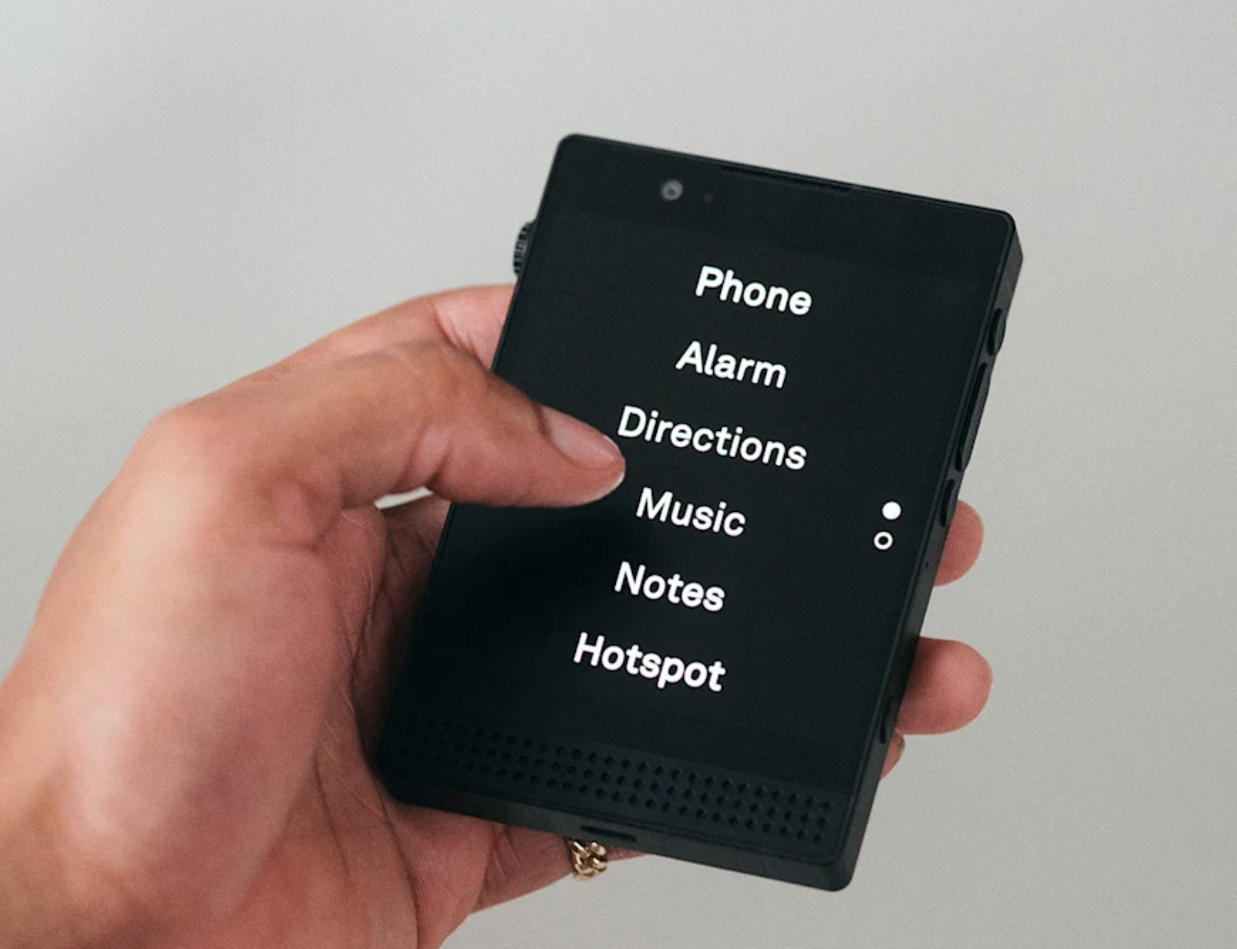
True dumbphones. Light Phone III, Light Flip, Punkt, Mudita or a basic Nokia. Tools, not apps. No feed. No app store. Very noble. Occasionally a nightmare in a Target parking lot.
Neither one makes you a better person. Pick the one that fits the week you actually live, not the one you’d post about.
Make a List of Everything Your Phone Does for You
Grab a pen. Write down every job your phone does. Index card, notebook, the back of a Dunkin’ receipt. Whatever’s handy.
Here’s mine to get you started:
| What the phone does | What breaks without it | The Slow Tech swap |
|---|---|---|
| Calls & texts | Almost nothing | Any dumbphone. This is the easy part. |
| 2FA / logins | Everything, if you skip this | Hardware keys + printed backup codes (more below) |
| Maps | Your first road trip or new coffee shop | Written directions, LightOS Directions, a standalone GPS or the smartphone in the glove box |
| Music | Car rides and chores | A transition phone, the SMPL radio or a no-Wi-Fi MP3 player |
| Photos | Kid moments, receipts | A dedicated camera: a Charmera or an old CCD point-and-shoot |
| Time | Phantom phone checks | An analog watch |
| Alarm | 11 p.m. negotiations with the nightstand | A real alarm clock. Phone charges in another room. |
| Notes | “I’ll remember it.” (You won’t.) | Index cards, a pocket notebook, an AlphaSmart for long drafts |
| Calendar | A missed dentist appointment | Wall calendar or paper planner, plus a Sunday check-in |
| Weather | Mild inconvenience | A window. AM radio. LightOS Weather if you went Light. |
| Rideshare | Airports, cities, late nights | LightOS Rideshare, the parked smartphone or (gasp) calling a cab |
| Work chat | Your paycheck | Slack on the desktop, scheduled phone checks |
| Payments | Tapping the card reader | A plastic card. Cash. Remember cash? |
| School / daycare apps | The one that humbles you | Keep the smartphone at home as an appliance |
If something on your list doesn’t have a replacement yet, you’re not ready to port your number. That’s not failure. That’s a to-do list.
The Ugly Stuff the Listicles Skip
2FA, or How Not to Lock Yourself Out of Your Own Life
This is the one that’ll actually bite you. Handle it before you port your number.
- Print your backup codes for Google, Apple, your bank, your email and your password manager. On actual paper. Put them somewhere you’ll remember.
- Buy two hardware keys. One goes on your keychain, one goes in the drawer with the codes. Register both. Test both.
- Get your authenticator codes off the smartphone. The Light Phone III has an authenticator tool. Otherwise, keep Aegis or Yubico Authenticator on an old Android that never leaves the house.
- Treat SMS codes like a spare tire. Your dumbphone can get bank texts, but don’t make that your whole plan.
- Kill “tap yes on your iPhone” as the only way into your accounts. Add a passkey or hardware key so the old phone isn’t holding you hostage.
If you only do one grown-up thing from this entire post, print the codes and buy the second key. Future you will send a fruit basket.
Maps
Anyone who learned to drive with a Hagstrom map folded the wrong way in the glove compartment is going to be fine.
Your options, from most friction to least: write the address down, print the route, use LightOS Directions (it’s MapQuest with a better haircut) or keep the smartphone in the glove box for drives you don’t know.
You’ll get lost once. You’ll live. You might even notice what the street looks like.
Banking, Slack, Photos, Music and the Dreaded School App
- Banking: Do it on a computer. SMS alerts can still hit your dumbphone. Just don’t move serious money around on a cheap imported Android you sideloaded after dinner.
- Slack: Lives on the desktop. The two-phone setup exists for jobs that still think being online means being loyal.
- Photos: A dedicated camera can’t show you a notification badge while you’re photographing your kid. That’s the whole point.
- Music: Transition phones are for people who want Spotify on a tiny miserable screen. A dedicated MP3 player is the cleaner fix. Or a CD. I know a guy.
- School apps: The portal will not run on a Nokia. It just won’t. Keep the smartphone at home for those ten-minute Saturday chores.
What to Buy (Based on How Much Hassle You Can Handle)
- Under $80, just want to test it out: Nokia 2660 Flip. Great weekend phone, great two-phone starter.
- Under $200, need music but still want friction: Cat S22 Flip. It’s ugly on purpose, and that’s a compliment.
- You like to tinker: Qin F21 Pro. Fun. Not exactly Fort Knox.
- You want the phone itself to be the philosophy: Light Phone III, Light Flip, Punkt or Mudita.
- Haven’t tried Level 1 yet? Don’t buy anything. A $400 phone that does less won’t fix a free habit you never tried to change.
Try It for 30 Days
Days 1–3: Make your list of phone jobs. Print the codes. Register the keys. Buy nothing.
Days 4–10: Level 1 on hard mode. Grayscale, five contacts get notifications, real alarm clock.
Days 11–20: Two phones. Prepaid flip in your pocket. Smartphone stays home.
Days 21–30: Port your number, stick with two phones or admit Level 1 was enough. Any of the three counts as a win.
A few house rules. No endless feeds on the new phone. No late-night dumbphone shopping on the old phone. And emergencies always get a pass. It’s a plan, not a cult.
The Bottom Line
Look, I’m not going to pretend a flip phone will fix your life. The CD tower didn’t fix mine. But it did teach me that a little friction goes a long way for a brain that’s running ten tabs at once.
You don’t need a new personality. You need a smaller pocket.
Calls on the phone. Email on the laptop. Music on a player. Time on a watch. Photos on a camera. Sleep in a room that doesn’t glow.
Start with grayscale if you’re being honest with yourself. Start with a $60 flip if you’re restless. Start with printed backup codes if you’re smart.
Now put the supercomputer down and text the babysitter the garage code. She’s been out there a while.
Power down your brain.